
Digital Signage for Corporate Offices and Lobbies
A practical Australian guide to digital signage for corporate offices with onQ advice on hardware, CMS workflow, rollout governance, measurement and support.
Digital Signage for Corporate Offices and Lobbies
Corporate digital signage covers a broad range of use cases: lobby welcome screens, meeting room displays, internal communications boards, wayfinding systems, executive briefing room screens and emergency messaging. What these applications share is that they need to be reliable, easy to update and appropriate for a professional environment.
This page covers the main corporate digital signage applications, the display formats that suit office and lobby environments, and how onQ delivers and supports corporate screen networks.
Corporate lobby and reception displays
The reception or lobby display is often the most visible screen in a corporate environment. It sets the tone for visitors and gives the organisation a way to communicate brand, values and current content to everyone who enters the building.
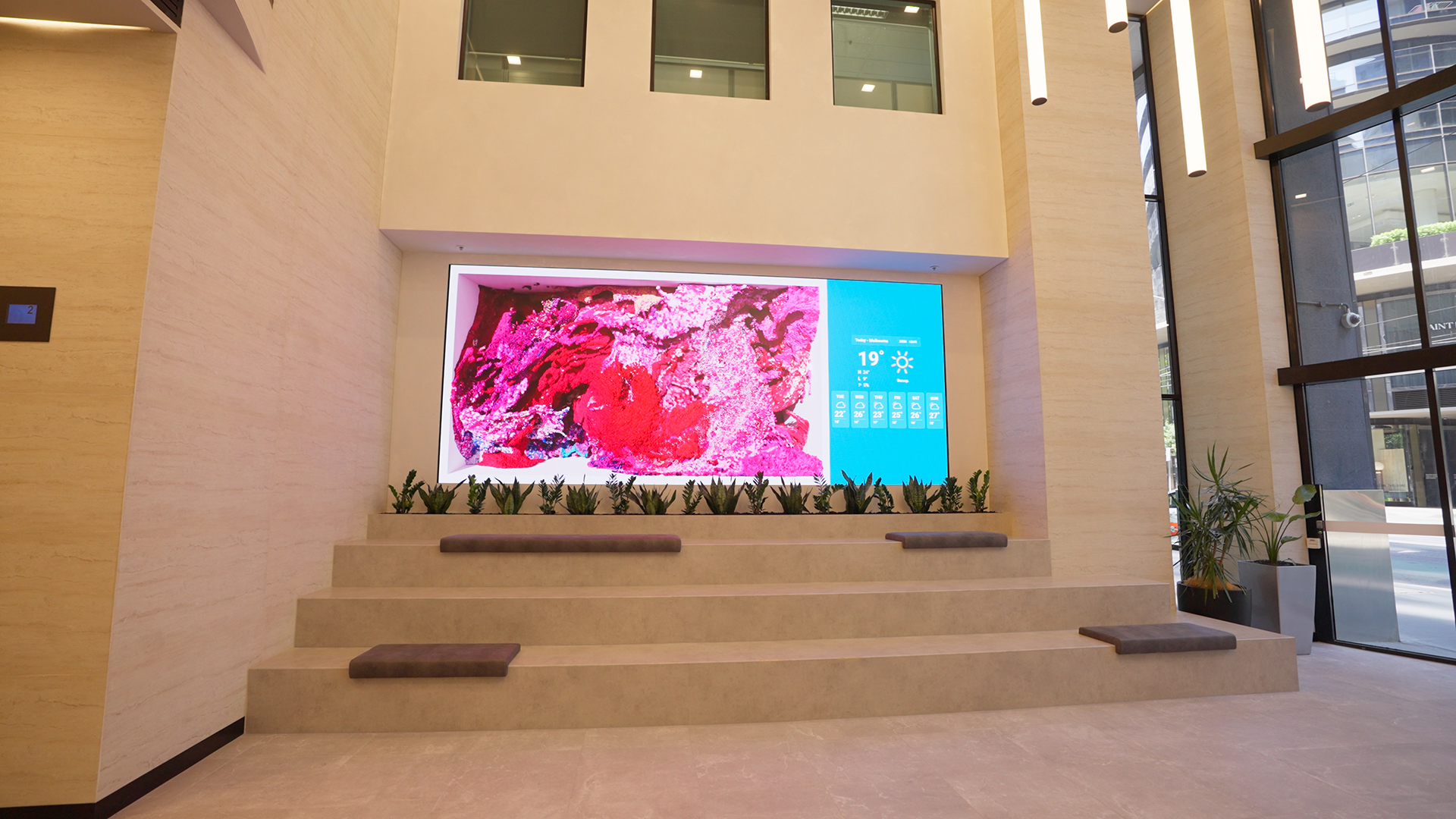
LED video walls are increasingly used in corporate lobbies where scale and visual impact are priorities. A well-specified LED wall can carry brand films, event content, welcome messaging and data visualisation in a format that feels architectural rather than added as an afterthought. Transparent LED on lobby glazing can carry content while keeping the space open and light.
LCD displays are used in lobby environments where a single screen or a small array of screens handles the communication requirement without the cost of LED. Commercial LCD in a lobby needs to be bright enough to be legible in ambient light, securely mounted and connected to the CMS for easy content updates.
Meeting room and collaboration displays
Meeting room displays are a practical category of corporate digital signage. They serve a functional role: showing what meeting is booked, when the room is occupied, and how to connect devices for presentations. The integration between the room booking system and the display is usually more important than the visual impact of the screen.
onQ can specify and install meeting room displays as part of a broader corporate digital signage project. For large corporate environments, meeting room signage is often managed through a dedicated room booking platform rather than the general content CMS.
Internal communications and employee-facing screens
Corporate screens in break rooms, corridors, lift lobbies and open-plan areas carry internal communications content: announcements, HR updates, safety information, performance data and company news. These screens serve a different audience from lobby displays and need content that is relevant to employees rather than visitors.
The CMS structure for employee-facing screens should allow the communications team to update content without requiring IT involvement for every change. Role-based access in the onQ CMS allows the communications team to manage their own content while IT retains control over the system configuration and network security.
Wayfinding and building directory
Large corporate campuses, multi-tenancy buildings and organisations with complex floor plans use digital wayfinding to help visitors and staff navigate. Touchscreen kiosks, corridor displays and lift lobby screens can carry a digital building directory that is easy to update when tenants, departments or room allocations change.
Static printed directories become outdated quickly in large organisations. A digital directory connected to the CMS stays current with minimal manual effort and can be updated from head office when building changes occur.
Emergency messaging
Corporate digital signage networks can carry emergency messaging when other communication channels are insufficient. A fire evacuation, a building lockdown or a severe weather event can be communicated to all connected screens simultaneously through the CMS, overriding normal content scheduling.
Emergency messaging capability needs to be planned into the CMS configuration from the start. The authorisation process for emergency overrides, the content templates for common emergency scenarios, and the test schedule for the system should all be agreed before the network goes live.
Display format selection for corporate environments
| Location | Recommended format | Primary purpose |
|---|---|---|
| Main lobby or reception | LED video wall or large commercial LCD | Brand, welcome messaging, visitor communications. |
| Meeting room entrance | Small commercial LCD or dedicated meeting room display | Room booking status and meeting schedule. |
| Open-plan employee areas | Commercial LCD or small LED display | Internal communications, announcements and safety messaging. |
| Lift lobby | Commercial LCD or freestanding digital totem | Wayfinding, event schedule and internal communications. |
| Executive briefing room | Commercial LCD or LED display | Presentations, data visualisation and brand content. |
| Building directory | Touchscreen kiosk | Interactive wayfinding and tenant or department directory. |
CMS governance for corporate environments
Corporate digital signage networks often have more content owners than the client expects. Marketing, HR, facilities, IT, legal and individual business units may all have content they want on screens. Without a clear governance model, the network becomes a source of conflicting content rather than a managed communication channel.
onQ helps corporate clients define content ownership, approval workflows and CMS access levels before the network goes live. This keeps the screen content aligned with the organisation's communication standards and makes the CMS easier to manage as the network grows.
Frequently asked questions
Can onQ install digital signage in corporate buildings across Australia?
Yes. onQ manages corporate digital signage projects across Melbourne, Sydney, Brisbane, Perth and Adelaide, including single-building installations and multi-site corporate networks.
Can corporate digital signage connect to room booking systems?
Yes, in many cases. Meeting room displays can be integrated with common room booking platforms. The integration approach depends on the specific platform and the display hardware. onQ can assess the integration requirements during the planning stage.
How is content managed across multiple floors and buildings?
onQ CMS organises screens by floor, building, zone or content owner, allowing central management with appropriate access levels for different teams. Content can be scheduled centrally and adjusted by location or user group.
Enjoy our insights? Add onQ Digital as a preferred source on Google to see more of our content in your search results.

Ready to start a conversation?
Speak with our team about digital signage, CMS software, or retail media infrastructure. We’ll help you scope, design, and deploy the right solution.

Digital signage, CMS software, retail media platforms, analytics, and managed services across Australia.
© 2026 onQ Digital. All rights reserved. Website by D&n