
Automotive Digital Signage Australia

Introduction
Enterprise Automotive Digital Signage, LED Displays & Retail Media Solutions for Australian Dealerships
Modern automotive dealerships increasingly use digital signage to:
- enhance showroom experiences
- promote vehicle launches
- support EV education
- automate campaigns
- improve customer engagement
- deliver immersive visual storytelling
- synchronise manufacturer campaigns
- support retail media advertising
- modernise dealership environments
As automotive retail becomes increasingly digital-first, dealerships across Australia are investing heavily in:
- LED video walls
- transparent LED displays
- dealership digital signage software
- customer engagement screens
- retail media screen networks
- service lane displays
- enterprise CMS platforms
- showroom digital infrastructure
At onQ Digital Group, we work with automotive groups, dealership networks and enterprise retail environments across Australia delivering:
- dealership digital signage
- LED display infrastructure
- transparent LED technology
- enterprise CMS software
- proof-of-play reporting
- audience analytics integrations
- retail media-ready screen networks
- national deployment capability
This guide explores how automotive digital signage is transforming dealership environments throughout Australia.
What Is Automotive Digital Signage?
Automotive digital signage refers to digital display systems used across:
- vehicle showrooms
- dealership windows
- customer lounges
- service centres
- EV education zones
- dealership forecourts
- parts departments
- automotive retail media networks
Automotive digital signage can include:
- LED video walls
- transparent LED screens
- LCD digital signage
- touchscreen kiosks
- digital menu boards
- customer information displays
- interactive product displays
- showroom CMS platforms
Modern automotive digital signage increasingly supports:
- enterprise content management
- campaign automation
- vehicle promotions
- manufacturer branding
- proof-of-play reporting
- audience analytics
- retail media advertising
- multi-location campaign synchronisation
Learn more:
Why Automotive Dealerships Are Investing in Digital Signage
Automotive dealerships increasingly require digital infrastructure capable of:
- supporting evolving vehicle launches
- modernising showroom environments
- enhancing customer engagement
- synchronising national campaigns
- supporting EV education
- automating marketing workflows
- improving dealership communication
- creating premium retail experiences
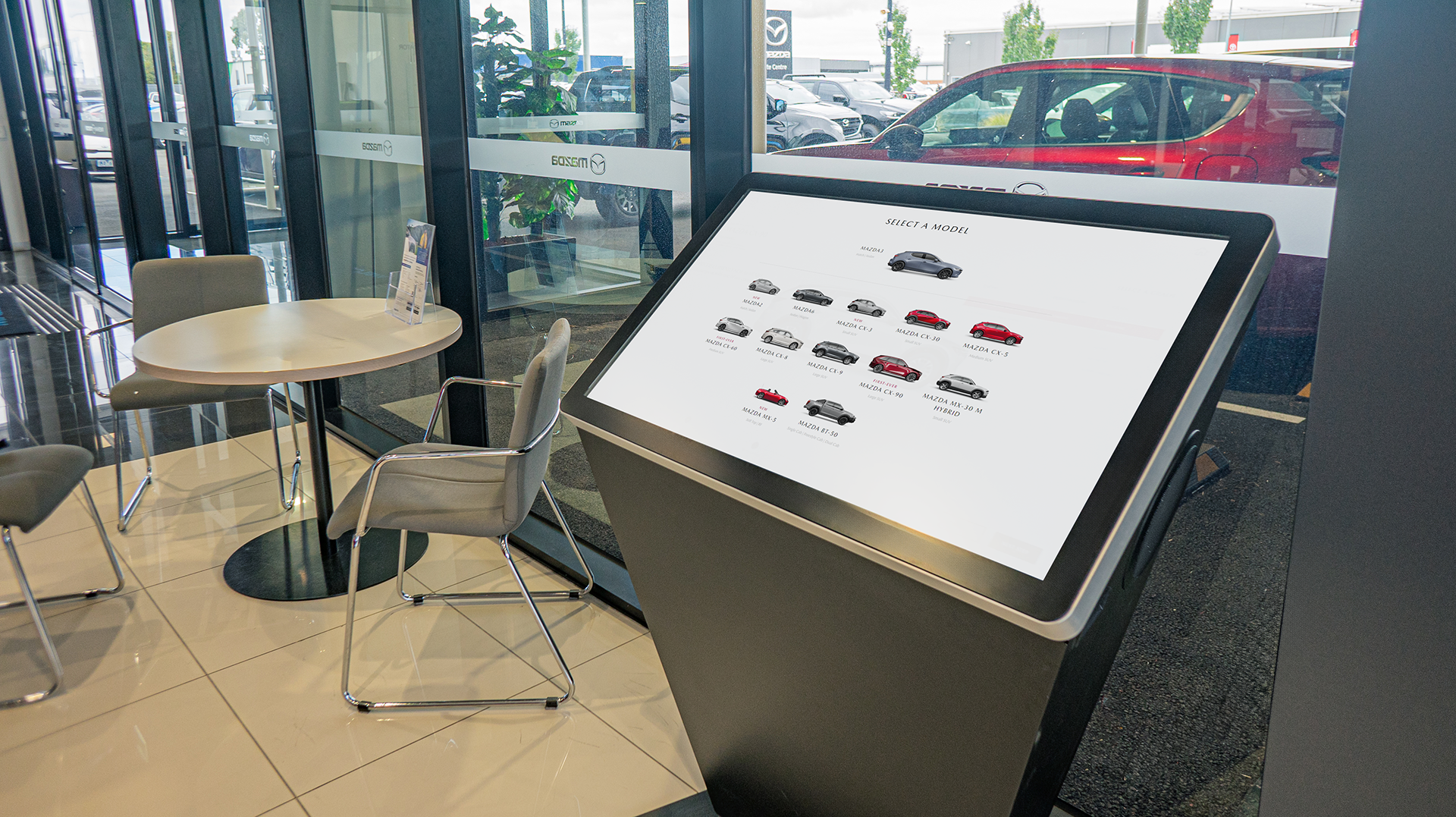
Modern dealership digital signage enables dealerships to:
- instantly update campaigns
- showcase vehicle features dynamically
- support immersive visual storytelling
- deliver premium showroom experiences
- reduce static printed signage
- improve customer engagement
- centralise campaign management
Digital signage is increasingly viewed as:
- automotive retail infrastructure
- dealership communication infrastructure
- retail media infrastructure
- customer engagement technology
rather than standalone display hardware.
Automotive Showroom LED Displays
LED display technology is becoming increasingly common across automotive showrooms because of its:
- seamless presentation
- premium image quality
- high brightness
- flexible sizing
- architectural integration capability

Automotive LED displays are commonly used for:
- showroom feature walls
- hero vehicle displays
- dealership entry screens
- launch campaigns
- immersive branding
- customer engagement zones
Modern dealership LED deployments increasingly include:
- fine-pitch LED
- curved LED displays
- transparent LED
- synchronised showroom screens
- high-brightness storefront displays
- COB LED technology
Explore:
LED vs LCD Displays for Automotive Showrooms
Automotive dealerships increasingly compare LED and LCD technology when designing digital showroom environments.
LED Displays
LED displays are ideal for:
- premium showroom environments
- immersive branding
- large-format feature walls
- dealership entries
- high-impact visual experiences
Key advantages include:
- seamless presentation
- higher brightness
- premium aesthetics
- flexible sizing
- superior visibility
LCD Displays
LCD displays are commonly used for:
- informational screens
- customer lounges
- menu board environments
- dealership waiting areas
- smaller promotional zones
Key advantages include:
- lower upfront costs
- simple deployment
- lightweight installations
For premium dealership environments, LED technology is increasingly preferred because of its:
- visual impact
- seamless presentation
- immersive showroom capability
- retail media potential
Learn more:
Transparent LED for Automotive Dealerships
Transparent LED technology has become increasingly popular across automotive dealerships and premium showroom environments.
Transparent LED displays allow dealerships to:
-p-1600.png)
- maintain natural light
- preserve showroom visibility
- create premium storefront advertising
- support after-hours campaigns
- deliver immersive branding
- promote vehicle launches dynamically
Transparent LED is particularly effective for:
- dealership windows
- premium automotive showrooms
- EV launch campaigns
- roadside visibility
- luxury automotive environments
onQ Digital has supported transparent LED deployments across automotive retail environments including Mitsubishi dealership networks throughout Australia.
Explore:
Transparent LED vs Static Window Vinyl
Traditional static window vinyl has long been used across dealership storefronts, but transparent LED technology is rapidly becoming a more dynamic alternative.
Transparent LED provides:
- dynamic content playback
- video capability
- campaign automation
- premium visual presentation
- day/night visibility
- retail media advertising capability
Unlike static signage, transparent LED allows dealerships to:
- update campaigns instantly
- promote live offers
- support manufacturer launches
- rotate content dynamically
- create immersive storefront experiences
while still maintaining:
- showroom visibility
- natural light transmission
- premium architectural aesthetics
Automotive Digital Signage Software & CMS Platforms
Enterprise dealership screen networks increasingly require cloud-based CMS software capable of managing:
- national dealership campaigns
- manufacturer-approved content
- showroom promotions
- synchronised campaigns
- proof-of-play reporting
- remote monitoring
- content governance
- audience analytics integrations
.png)
Modern dealership CMS platforms increasingly support:
- retail media workflows
- campaign automation
- dynamic content feeds
- API integrations
- cloud deployment
- multi-screen synchronisation
- enterprise permissions
onQ CMS is designed to support:
- enterprise automotive deployments
- dealership campaign automation
- retail media workflows
- national screen networks
- proof-of-play reporting
- synchronised content management
Explore:
Automotive Retail Media Networks
Automotive dealerships increasingly operate as retail media environments.
Modern dealership screen networks can support:
-p-1080.png)
- manufacturer campaigns
- supplier-funded advertising
- finance promotions
- EV education
- service lane campaigns
- aftermarket promotions
- customer engagement campaigns
Retail media functionality increasingly includes:
- proof-of-play reporting
- campaign scheduling
- audience analytics
- advertiser workflows
- dealership-wide synchronisation
- enterprise campaign governance
This transforms dealership screen networks into:
- monetisable media infrastructure
- enterprise communication ecosystems
- automotive customer engagement platforms
Learn more:
Automotive Retail Media Use Cases
Automotive retail media increasingly supports:
- OEM advertising
- EV education campaigns
- finance partner advertising
- service promotions
- tyre & accessory advertising
- insurance campaigns
- customer engagement experiences
Dealership groups increasingly monetise:
- showroom screens
- customer lounges
- service waiting areas
- storefront displays
- roadside digital signage
through retail media campaign infrastructure.
EV Showrooms & Digital Signage
As EV adoption continues to grow across Australia, dealerships increasingly require digital infrastructure capable of supporting:
- EV education
- charging information
- sustainability messaging
- interactive customer engagement
- launch campaigns
- immersive storytelling
Digital signage allows dealerships to:
- educate customers dynamically
- instantly update vehicle specifications
- support launch campaigns
- deliver immersive visual experiences
- synchronise manufacturer campaigns nationally
This is particularly important for:
- EV showrooms
- premium automotive retail
- launch environments
- experiential dealership spaces
Multi-Location Automotive Screen Networks
Large dealership groups increasingly require enterprise CMS platforms capable of:
- centrally managing content
- synchronising campaigns
- controlling permissions
- automating updates
- managing multiple brands
- monitoring screen health
- validating campaign playback
Modern automotive CMS platforms increasingly support:
- cloud-based management
- API integrations
- remote diagnostics
- audience analytics
- proof-of-play reporting
- retail media workflows
Explore:
Automotive Digital Signage Case Studies
Automotive digital signage is increasingly being deployed across:
- dealership networks
- EV showrooms
- premium automotive environments
- service centres
- customer engagement zones
-p-1600.png)
onQ Digital has supported deployments across:
- Mitsubishi Motors dealership networks
- BYD showroom environments
- Mazda dealership displays
- premium automotive retail environments
These deployments increasingly combine:
- LED displays
- transparent LED technology
- enterprise CMS software
- synchronised campaign delivery
- proof-of-play reporting
- audience engagement systems
Key Features to Look for in Automotive Digital Signage
Dealerships evaluating automotive digital signage providers should consider:
- CMS software capability
- LED display quality
- transparent LED capability
- national rollout experience
- proof-of-play reporting
- cloud deployment
- remote monitoring
- audience analytics
- support infrastructure
- retail media readiness
- manufacturer compliance
- enterprise deployment capability
Modern dealership environments increasingly require providers capable of delivering:
- hardware
- software
- deployment
- analytics
- retail media workflows
- support services
through one integrated ecosystem.
Future Trends in Automotive Digital Signage
Several major trends are shaping the future of automotive digital signage, including:
- AI-generated content
- EV education displays
- transparent LED
- audience analytics
- retail media monetisation
- programmatic advertising
- immersive showroom experiences
- cloud-based CMS platforms
- synchronised multi-screen storytelling
Automotive digital signage is increasingly evolving into:
- retail media infrastructure
- customer engagement ecosystems
- dealership communication platforms
- immersive automotive retail environments
rather than standalone display systems.
Explore:
Recommended Related Pages
Frequently Asked Questions
Automotive digital signage uses screens, LED displays and CMS software to communicate offers, vehicle information, service messages and brand content in dealerships.
Screens are commonly used at entrances, showrooms, service reception, customer lounges, parts areas, finance desks and exterior frontages.
Yes. A cloud CMS can manage national dealer groups, regional locations and local content permissions from one platform.
Large-format LCD, LED video walls and high-brightness displays can work well depending on viewing distance, ambient light and design intent.
Yes. Campaigns can include vehicle launches, finance offers, stock highlights, accessories, service promotions and brand content.
Yes. onQ supports hardware, CMS configuration, installation and ongoing support for dealership and automotive retail environments.
Yes, if permissions are configured. Local teams can be given controlled access while head office maintains brand governance.
Proof-of-play confirms that scheduled content played on the selected dealership screens during the campaign period.
Yes. Some dealership networks can support partner campaigns when screen inventory, governance and reporting are properly managed.
Outdoor LED can suit dealership frontage and roadside visibility when brightness, weather rating and council considerations are assessed.
CMS software centralises scheduling, user permissions, screen grouping, device monitoring and reporting across multiple sites.
They should consider audience flow, ambient light, content ownership, brand rules, network access, support and reporting requirements.
Transparent LED is a display technology designed for glass surfaces while maintaining visibility through the display.
Proof-of-play reporting verifies content or advertising playback.
Automotive dealerships commonly use:
- LED video walls
- transparent LED displays
- LCD digital signage
- touchscreen kiosks
- showroom feature displays
- outdoor LED signage
Yes. Automotive dealership screen networks increasingly support retail media advertising through campaign scheduling, proof-of-play reporting, audience analytics and enterprise CMS platforms.
Related Case Studies


Digital signage, CMS software, retail media platforms, analytics, and managed services across Australia.
© 2026 onQ Digital. All rights reserved. Website by D&n